Certificates
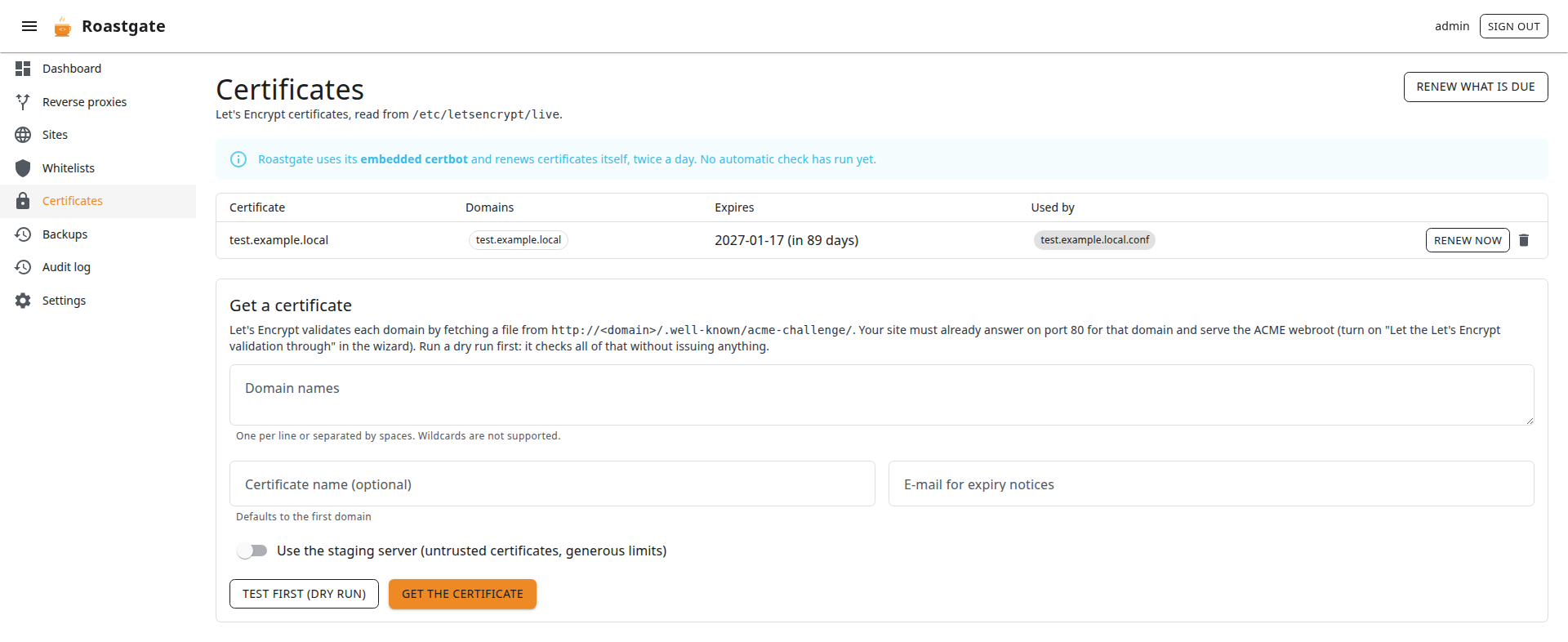
The Certificates page manages Let's Encrypt certificates with certbot. The certificates are read from the files certbot maintains (/etc/letsencrypt/live by default), not from its text output.
Certificate modes
The mode is chosen during the setup and can be changed in the settings:
| Mode | Who runs certbot | Who renews |
|---|---|---|
| Embedded certbot | the certbot shipped in the Roastgate image | Roastgate, twice a day |
| certbot installed on the host | the host's certbot, driven through nsenter | the host's own certbot timer |
| Do not manage certificates | nobody: Roastgate only lists what it finds | — |
In embedded mode, the page shows the time and result of the last automatic check.
If you use the embedded certbot while certbot is also installed on the host, disable the host's certbot timer, or switch to host mode. The setup diagnostics warn you about it.
The list
Each certificate shows its name, domains, expiry date and which configs use it (a disabled config is marked). Certificates from the staging server are flagged: browsers do not trust them.
- Renew now: renews this certificate, even if it is not due yet.
- Renew what is due (top of the page): renews every certificate close to its expiry.
- Delete: deletes the certificate. A certificate still used by a config cannot be deleted.
nginx is reloaded only when a certificate really changed (the file is compared before and after), so it never keeps serving an old one. A failed reload is reported.
Get a certificate
Let's Encrypt validates each domain by fetching a file from http://<domain>/.well-known/acme-challenge/. Before you start:
- The domain points to your server (DNS
A/AAAArecords). - nginx answers on port 80 for that domain.
- That server block serves the ACME webroot: tick Let the Let's Encrypt validation through in the wizard.
Then fill in the Get a certificate form:
- Domain names: one per line or separated by spaces.
- Certificate name (optional): defaults to the first domain.
- E-mail for expiry notices: defaults to the one in the settings.
- Use the staging server: untrusted certificates, with generous rate limits. Useful for tests.
Click Test first (dry run): it checks everything against Let's Encrypt's staging server without issuing anything. When it passes, click Get the certificate.
Then use the certificate in the HTTPS tab of the wizard: pick it in Use a Let's Encrypt certificate and the paths are filled in.
Wildcard certificates (*.example.com) need a DNS challenge and are not supported.